Elephant Foot: Why the First Layer Squishes Out
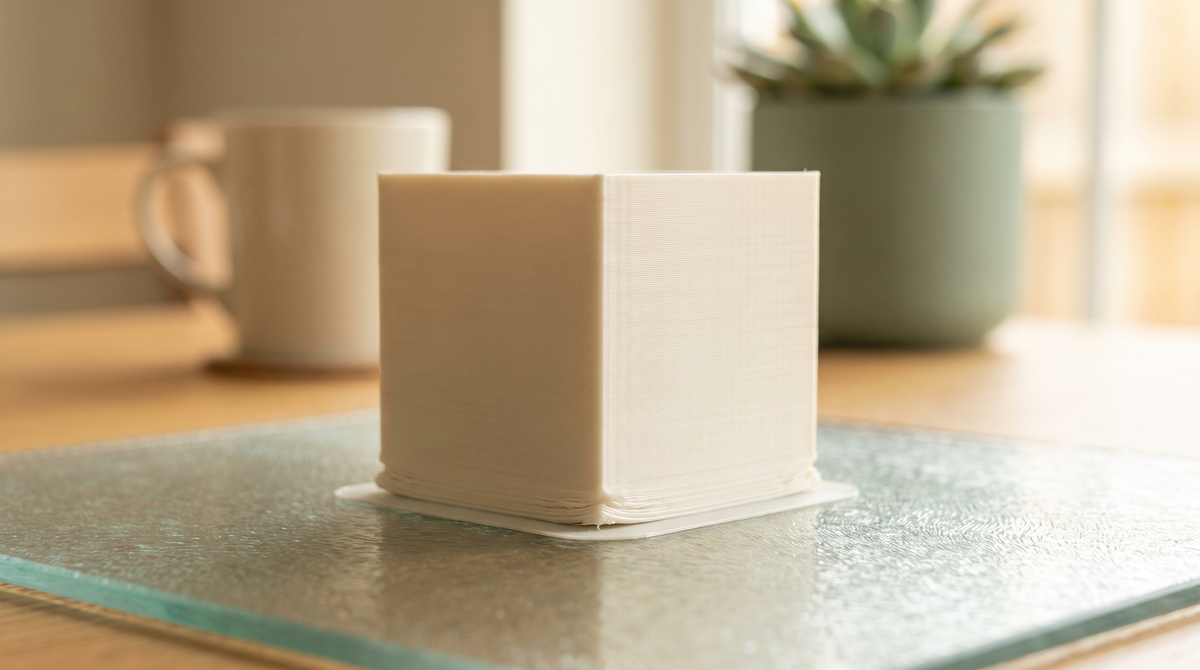
Elephant foot is when the bottom few layers of a print bulge outward, so the base is wider than the rest.
On a decorative piece it's cosmetic and you might not notice. On anything that has to fit — a lid, a bracket, a print-in-place joint — it's the difference between working and not.
Why it happens
Two things combine.
The first layer is deliberately squashed. That's how adhesion works — the nozzle presses the plastic into the plate, which spreads it wider than its nominal width. That's a feature, not a fault.
The bed is hot and the plastic hasn't set. The lower layers stay soft while the weight of the print above presses down on them. Soft plastic under load spreads outward.
So it's squish plus heat plus weight. Fixes address one of the three.
Fix 1: Elephant foot compensation
The direct approach, and most slicers have it built in.
Look for a setting called elephant foot compensation or initial layer horizontal expansion. It shrinks the first layer or two inward by a set amount to counteract the spread.
Start around 0.1mm and adjust. Too much and you'll see a visible step where the compensated layers meet the rest.
This treats the symptom rather than the cause, but it's quick and it works.
Fix 2: Lower the bed temperature
Often the actual cause, and the fix people don't think of.
If your bed is hotter than it needs to be, the lower layers stay soft for longer and spread more under the weight above.
Try dropping 5°C at a time. You're looking for the lowest temperature that still gives reliable adhesion. For PLA, somewhere in the 50s is often plenty — many default profiles run hotter than necessary.
The trade-off is real: too low and you get warping and parts coming loose. You're finding a balance rather than a maximum.
Fix 3: Raise the Z offset slightly
If your nozzle is too close to the plate, the first layer is over-squashed and the elephant foot is exaggerated.
Nudge the Z offset up in 0.02mm steps and watch the first layer. You want lines that are touching and slightly flattened — not lines being scraped into the plate.
Careful with this one: too far and you lose adhesion entirely, which is a worse problem than a slightly wide base.
The design fix
If you control the model, a small chamfer on the bottom edge — half a millimeter at 45 degrees — gives the spreading plastic somewhere to go.
The bulge fills the chamfer instead of extending past the intended dimension, and the result is a clean square edge.
This is what I do on anything designed to fit something else. It's more reliable than compensation because it works regardless of who's printing it and what their bed temperature is.
Why it matters for fitted parts
Worth spelling out, because it explains a lot of confusing failures.
If a part is meant to slide into something, elephant foot makes the bottom too wide and it jams. If two halves press together, the bulged rims won't seat. If a print-in-place joint sits on the first layer, the spread can close the clearance gap and fuse the joint solid.
That last one is a common reason print-in-place models fail for some people and not others, and it's entirely a first-layer problem.
Sometimes the cleanest fix is simply to lift the model a few millimeters off the plate and support underneath, moving the critical geometry away from the squished layers.
How to check
Print a simple cube. Measure it with calipers at the very bottom and again 10mm up.
If the bottom is wider, that difference is your elephant foot, and it's the number to compensate for.
Worth doing once. It tells you something about your printer that applies to everything you print afterward.
Has elephant foot ever ruined a fit for you? Mine was a two-part box that would not close and took me embarrassingly long to diagnose. 🫠