Stringing on a Bambu Lab: What Finally Fixed It for Me
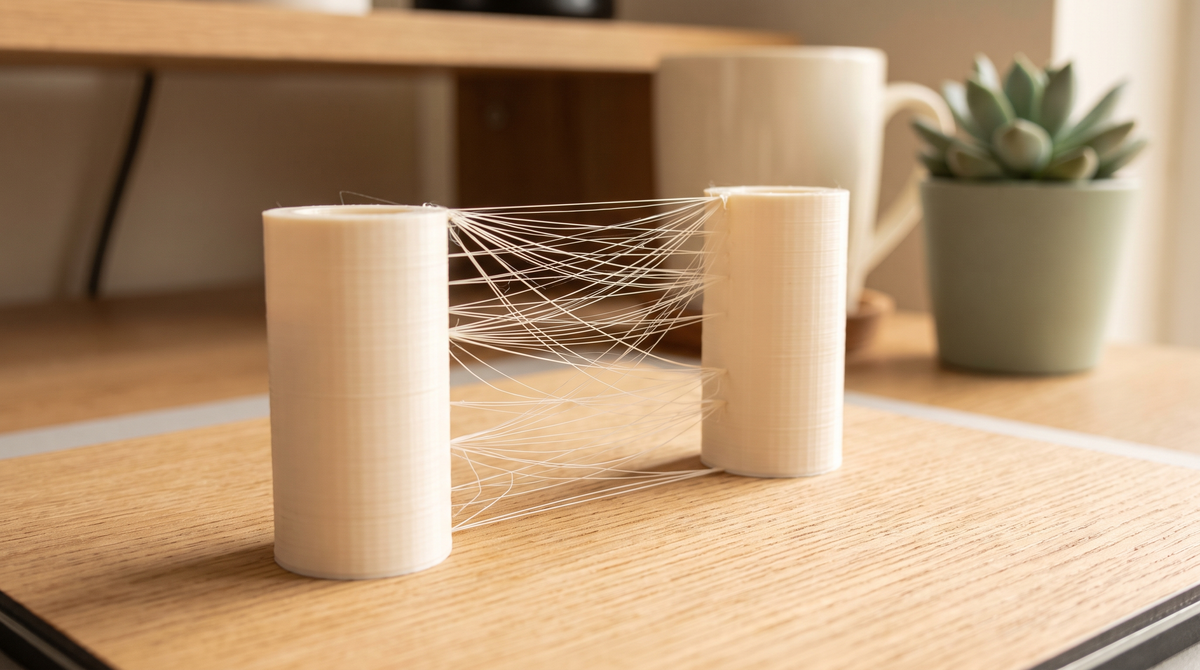
Stringing is the one that made me feel like I was doing something wrong as a person.
You get a print that's structurally perfect, and it's covered in these fine wispy threads between every separate part, like the printer built a cobweb around your model. It looks careless. It feels like a failure.
It's usually one specific thing, and it's usually not the thing the internet tells you first.
What's actually happening
When the nozzle finishes one bit and travels to another, molten plastic wants to keep coming out. Pressure inside the hot end, gravity, and the fact that the plastic is sticky all conspire. It drags a thin thread behind it.
So every fix is really answering one of two questions: is there too much pressure in the nozzle, or is the plastic too runny?
Start with the filament, not the settings
This is the one I resisted for months and it turned out to be my answer.
Wet filament strings. Not "slightly worse" — dramatically worse. PLA absorbs moisture from the air, and when that damp filament hits a 220°C hot end, the water inside flashes to steam. That steam blows tiny bubbles out of the nozzle, and it makes the plastic behave completely differently.
Signs your filament is wet: popping or crackling sounds while printing, a rough matte surface where it should be glossy, and stringing that appeared on a spool that used to print fine.
Dry PLA at about 45°C for six to eight hours. PETG wants more like 65°C. If you've got a filament dryer, use it. If you don't, this is the accessory I'd buy first — ahead of a second printer, ahead of most upgrades.
I changed nothing else and my stringing halved. I felt slightly foolish.
Then temperature
Too hot and the plastic is too fluid to stay put. This is the second most common cause and it's easy to test.
Run a temperature tower — it's built into the calibration menu in Bambu Studio and Orca Slicer. It prints the same shape at a range of temperatures in one go, and you look at it afterwards and pick the band that looks cleanest.
Do this for every new filament brand, not just every material. Two different brands of "PLA" can want temperatures 15°C apart. The number on the spool is a starting suggestion, not an answer.
If everything looks decent, drop 5°C anyway. Small reductions often clean up stringing with no downside.
Then retraction
Now we get to the setting everyone starts with.
Retraction pulls the filament back slightly before a travel move, relieving pressure so less oozes out. On a direct drive setup — which is what most current Bambu machines use — you need much less retraction than older Bowden printers did. Something in the region of 0.8mm is often plenty.
More is not better. Over-retracting pulls molten plastic back up into the cold part of the hot end where it can jam, and you trade stringing for clogs. That's a bad trade.
Change it in small steps, 0.2mm at a time, and print a test between each.
The travel settings that help
Two worth knowing:
Avoid crossing walls. Reroutes travel moves so the nozzle stays over infill instead of dragging across your visible outer surface. Any oozing lands somewhere it won't show. Costs a little print time, well worth it.
Travel speed. Faster travel means less time for a string to form. If your travel speed is conservative, raising it can help — though at some point you start fighting the machine's own vibration, so don't get carried away.
The order I'd actually work through it
- Dry the filament. Genuinely, first, before anything else.
- Run a temperature tower and drop to the cleanest band.
- Turn on avoid crossing walls.
- Adjust retraction in small steps.
- Raise travel speed a little.
Change one at a time. If you change all five and it improves, you've learned nothing you can reuse next time.
The strings that don't matter
Worth saying: a few fine wisps on a complex model with lots of separate sections is normal. They brush off, or a quick pass with a heat gun on low will make them vanish.
You're chasing "clean enough that a light brush fixes it," not laboratory perfection. Perfect is available but it costs a lot of tuning time for a difference nobody but you will notice.
Common questions
Why did stringing start on a spool that was fine before?
Moisture. That's nearly always it. The spool sat out and absorbed water from the air.
Does stringing mean my printer is broken?
No. It's almost always material or settings. Worth checking your nozzle isn't worn if nothing else helps.
Is silk PLA worse for stringing?
Yes, noticeably. It runs hotter and flows more. Expect to spend more time tuning it, and expect a little stringing regardless.
Will the included profiles in your files handle this?
The 3MF project files carry a tested profile for the model, which handles the model-specific settings. Filament dryness is still on you — no profile can fix a wet spool.
Be honest: how long did you fight stringing before you tried drying your filament? I went months. 🫠