First Layer Problems: The 10-Minute Fix
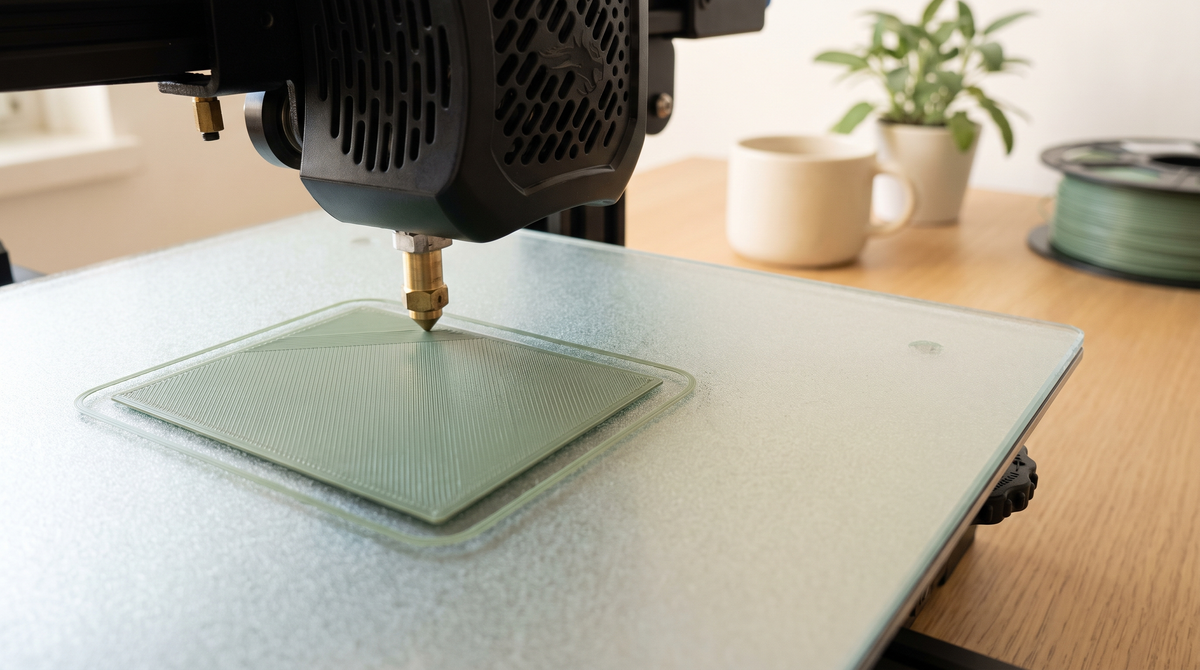
If I could give one piece of advice to someone new to this, it would be: stand and watch the first layer. All of it.
It takes five minutes and it predicts almost everything that happens afterward. A print with a bad first layer does not recover. There is no setting further up that rescues it.
What a good first layer looks like
Slightly squashed. The lines should be touching each other with no gaps between them, forming what looks like a solid sheet rather than a row of separate strings.
It should be uniform across the whole plate. Same look in the corners as in the middle.
And it should be a little wider and flatter than the lines further up the print. That's intentional — the squash is what makes it stick.
Reading the symptoms
Gaps between the lines. The nozzle is too far from the plate. The plastic is being laid down rather than pressed down, so lines sit as separate strands. Lower the nozzle — in most slicers this is the Z offset, and you want to move it in small increments, 0.02mm at a time.
Rippled, translucent, or scraped-looking. Nozzle too close. It's digging in, and there's nowhere for the plastic to go so it squeezes out sideways and gets dragged. Raise the Z offset slightly.
Good in the middle, bad at the edges (or vice versa). The plate isn't level, or it's warped. Run your printer's bed leveling routine. If it's still uneven after that, the plate itself may have a slight bow.
Sticks fine, then lets go partway through. That's usually contamination rather than height — see below.
Nothing comes out for the first few lines. Normal-ish, if it's only a tiny amount. That's residual ooze being cleared. If it persists, your priming line isn't doing its job.
The cause most people miss
A dirty plate. And I mean invisible dirt.
Every time you pick the plate up with your fingers, you leave skin oil on it. It's not visible. It builds up gradually over weeks. And it's enough to prevent adhesion entirely.
This is why prints get slowly worse over time and people end up chasing settings that were never the problem.
Wash the plate with warm water and dish soap. Properly, in the sink, with your hands. Not a wipe with a cloth — a cloth just moves the oil around. Rinse it, let it dry, and handle it by the edges from then on.
If you do one thing from this post, do that. It fixes an extraordinary proportion of adhesion problems.
What about isopropyl alcohol?
It's fine for a quick clean between prints, and it's what most people reach for.
But it doesn't remove oils as well as soap does — it tends to thin them and spread them. For a proper reset, soap and water is genuinely better. IPA for maintenance, soap for problems.
Temperature
Bed temperature matters more than people expect. Too cool and PLA won't grip; too hot and you get elephant foot, where the bottom few layers bulge outward.
Around 55–60°C is a sensible PLA range. If you're getting good adhesion but a bulging base, come down a few degrees.
When to use a brim
A brim is a single-layer skirt attached to the base of the print, and it's excellent insurance.
Use one when: the model has a small footprint, it's tall, it has thin legs or corners, or you're printing something that's failed at the corners before.
It costs a few grams and about a minute of print time, and it peels off easily. On a long print it's close to free insurance — see why long prints fail for why corner lift matters so much.
The ten-minute routine
- Wash the plate with soap and water. Dry it. Handle by the edges.
- Run the bed leveling routine.
- Start a print and watch the whole first layer.
- Adjust Z offset in 0.02mm steps if the lines have gaps or look scraped.
- Add a brim if the footprint is small.
That's it. Most adhesion problems are solved somewhere in those five steps, and step one solves more than the rest combined.
Be honest — when did you last actually wash your build plate? I went months before I learned. 👀